
Description
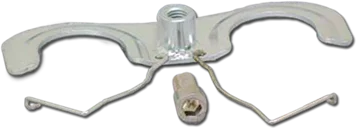
The Phoenix USA ND1912 Front Bracket (PND1907BKT) is a crucial component designed specifically for the secure installation of front wheel simulators from the Phoenix USA ND1912 and ND1912F kits. This bracket plays a vital role in ensuring that the front wheel simulator covers are firmly attached to the wheels of compatible vehicles, providing both aesthetic enhancement and protection. Engineered by Phoenix USA, a trusted name in aftermarket vehicle accessories, this front bracket is manufactured to meet high standards of quality and reliability.
KEY FEATURES AND BENEFITS:
- Essential Component: Specifically designed for mounting Phoenix USA ND1912 series front wheel simulators.
- Secure Fitment: Precisely fits within the lug nut assembly of compatible wheels to anchor the simulator.
- Easy Installation: Designed for straightforward mounting and stable attachment.
- Includes Hardware: Comes with one 10mm hex allen head M18x1.25 thread screw (16mm length) for proper installation.
- Genuine Part: Ensures compatibility and reliable performance with ND1912 or ND1912F kits.
SPECIFICATIONS:
- Product Name: Phoenix USA ND1912 Front Bracket
- Part Number: PND1907BKT
- Type: Front Simulator Mounting Bracket
- Included Hardware: One (1) 10mm Hex Allen Head Screw, M18x1.25 Thread, 16mm Length
- Compatibility:
- Phoenix USA ND1912 Front Wheel Simulator Kits
- Phoenix USA ND1912F Front Wheel Simulator Sets
- Dodge Ram 4500 and 5500 (2008–present)
- Vehicles with 19.5-inch wheels, 10-lug bolt pattern, 5 hand holes
HOW TO USE:
- Identify the Correct Lug Nuts: Locate two adjacent lug nuts on the front wheel of your vehicle.
- Position the Bracket: Slip the bracket into the gap between a lug nut and its washer so it sits securely against the wheel.
- Repeat for the Second Lug Nut: Insert the other end of the bracket between the adjacent lug nut and washer.
- Attach the Simulator: Align the simulator’s mounting points with the installed bracket.
- Secure with the Provided Screw: Use a 10mm hex allen wrench to fasten the included screw into the bracket’s threaded hole.
- Repeat for the Other Wheel: Install the bracket and simulator on the opposite front wheel using the same steps.
BENEFITS OF USING PHOENIX USA ND1912 FRONT BRACKET (PND1907BKT):
- Ensures secure mounting of ND1912 front wheel simulators.
- Eliminates movement or rattling during vehicle operation.
- Preserves the aesthetic and protective functionality of the simulators.
- Speeds up installation with included hardware.
- Guarantees compatibility and longevity as a genuine Phoenix USA component.
FEATURES:
- Precision design for ND1912 front wheel simulator kits.
- Fits securely between lug nuts and washers.
- Acts as a solid anchor for simulator mounting.
- Threaded hole allows easy screw installation.
- Ensures proper and flush simulator positioning.
- Reduces vibration and potential noise.
- Maintains correct alignment of simulators.
- Preserves visual appeal of front wheels.
- Engineered to meet Phoenix USA durability standards.
Reviews
There are no reviews yet.